On August 21 President Donald Trump issued an executive order for a national initiative to improve digital experiences for Americans called “America by Design”. After establishing a National Design Studio, one of the first products was AmericaByDesign.gov —which is deplorable for all. And⠀I’m going to explain why.
If⠀You’re New Here
Hi, my name is Frank (paceaux). I’ve been a software engineer for about 15 years. For all of that time — and before that — I have worked in the web content management space. My strongest skills in this domain are in front-end development where I write the HTML, CSS, and JavaScript that produces the user interfaces which allow users to interact with their content management software and/or the website managed by that software. Because most of my career was at agencies and because I specialized in a specific enterprise-level CMS, much of my work has been for large companies whose revenues are measured in the billions.
I can’t even say “large brands” because what I built was the stuff that managed many different brands.
The non-tech TL;DR
I’m an expert in making websites and making website-making software for really big companies.
AmericaByDesign dot com Sucks
Me, who is an authority
AmericaByDesign is a textbook case of everything you should not do in building a website.
Accessibility (A11y)
It’s important that we make UIs that can be accessed by as many people as possible.
For big corporations this is important because it’s about revenue; you can’t make money from someone if they can’t access content on your website.
For the government this is important because it’s about knowledge; you can’t have an informed population if they can’t access content on your website.
So when we say accessibility, we’re talking about making sure web content is accessible to any disability that could prevent web access:
- Visual (Blind, low⠀vision, colorblind)
- Auditory (Deaf, hard of hearing)
- Neurological (Vestibular motion disorders, auditory processing, learning disabilities )
- Physical (Muscle control disorders, unusable limbs)
- Speech (Unable to speak, unable control speech)
AmericaByDesign is not⠀accessible
Not by any meaningful measure is this site accessible.
It’s got a really bad score
AccessibilityChecker tells you it has 288 issues. In fact this government site is flagged as, “not compliant under US law”
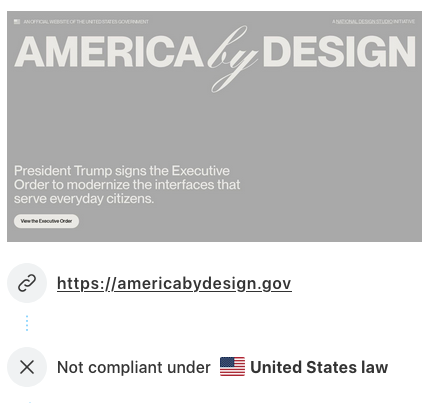
All of the automatically found issues are Low Vision / Colorblindness
The 288 issues flagged are because the text animates from a grey to a dark black as you scroll the content. So you might think, “oh, so that’s only temporary! It becomes accessible as you scroll.”
It ain’t that simple. It’s much worse, in fact.
If you don’t have JavaScript enabled, the site is a nightmare for low-vision folks
Having text that fades from grey to black is a great idea so long as the fading always works. But if the user
- has JavaScript disabled
- has a slow internet connection
- is printing out the content
Then this text is very hard to read.
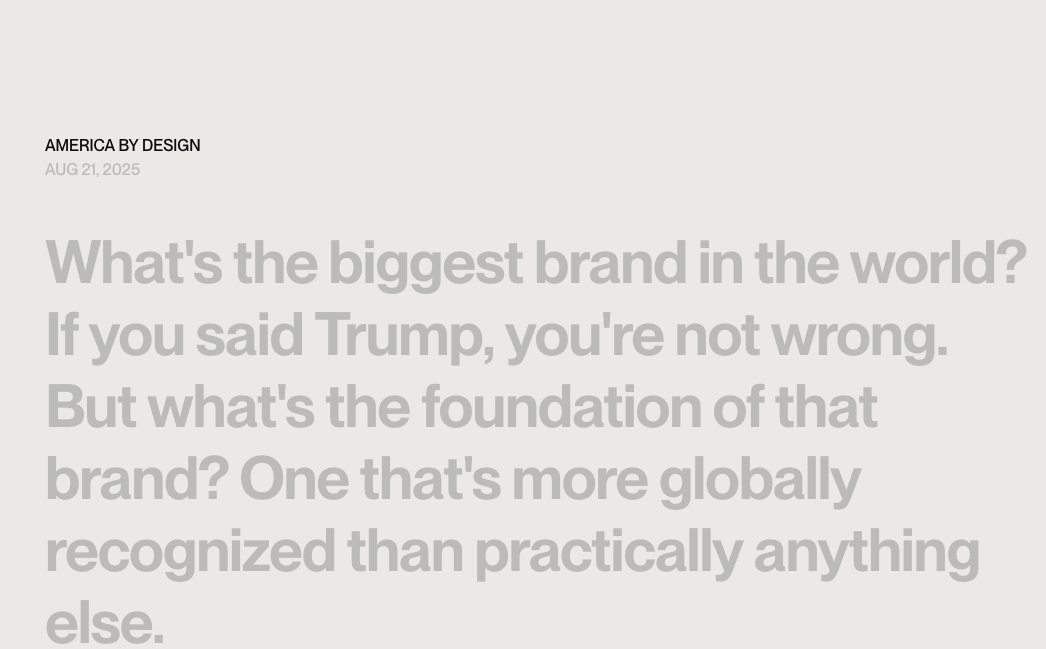
You can’t turn off the animation video at the top

Regardless of setting “reduce motion” or turning off autoplaying of animated images, that AI-generated waving flag is going to keep waving. Because it’s not an animated gif but a video. A video with the controls disabled.
So folks with vestibular motion disorders or cognitive disorders are stuck with a 10 second video autoplaying on a loop with no way to stop it.
The loop also creates a cognitive problem because the start and end points aren’t the same; it’s very obvious when the loop starts over.
What overlays the video isn’t text
Quite frustratingly, what’s on top of the video isn’t text but an image with text in it.


At least there’s alt text for the image. But that means that anyone who’s using a screen reader hears, “America First Legal logo.”
Which… is not what the image “says” at all. So the alt text is not descriptive of what it contains, which is how we’re supposed to use it.
Semantics
In web development terms, semantics means using HTML tags that give meaning to their content. When we have good HTML semantics, screen readers can properly describe the content to visually impaired folks. Not only that, search engines understand the web page and know how to properly rank it.
In addition to that, HTML semantics makes code more readable to other developers.
So all around, using semantic HTML benefits everyone.
AmericaByDesign doesn’t use any semantics
This site has no structure at all that could help a blind person or a search engine in understanding what the site is about.
There are no heading elements
None. Not one. You won’t find
h1h2h3h4h5h6
at all.
Screen readers look at for the heading levels on a page so that a reader can navigate through the content by heading level, essentially like a table of contents.
This site has no page organization at all.
The fact that it doesn’t even have an h1 means that neither a blind user nor a search engine even knows what the content of the page is about.
I have never seen a website without any headings before. Ever.
It doesn’t have global header or a footer
This site doesn’t have a header element at all.
It has a footer which is placed inside the main. When you put a footer inside of a main, that makes it a footer for the page-specific content. Which means there’s no global footer, either.
There’s just a footer for page-level content.
And, shockingly, the page-level footer doesn’t… have… page-level footer content. It looks like it should be a global footer:

main, not a childIt barely has structural semantics
The site uses main, section, and footer. That’s it.
This is all of the semantic structure you get:
<body>
  <section aria-label="Notifications alt+T" tabindex="-1" aria-live="polite" aria-relevant="additions text" aria-atomic="false"></section>
  <main class="relative w-full flex flex-col __className_1c703f">
    <section class="relative min-h-screen w-full overflow-hidden pt-6 px-3 pb-24 md:px-6 sm:pb-12 flex flex-col"></section>
    <div style="position:absolute;left:-9999px;opacity:0;pointer-events:none"></div>
    <div class="bg-main-light w-full flex"></div>
    <footer class="w-full flex flex-col bg-main-light py-6 px-3 md:px-6 z-20 gap-6 md:gap-0"></footer>
  </main>
</body>
If you’re wondering what the result is, hop over to Firefox, open developer tools, and look at the document structure under Accessibility.
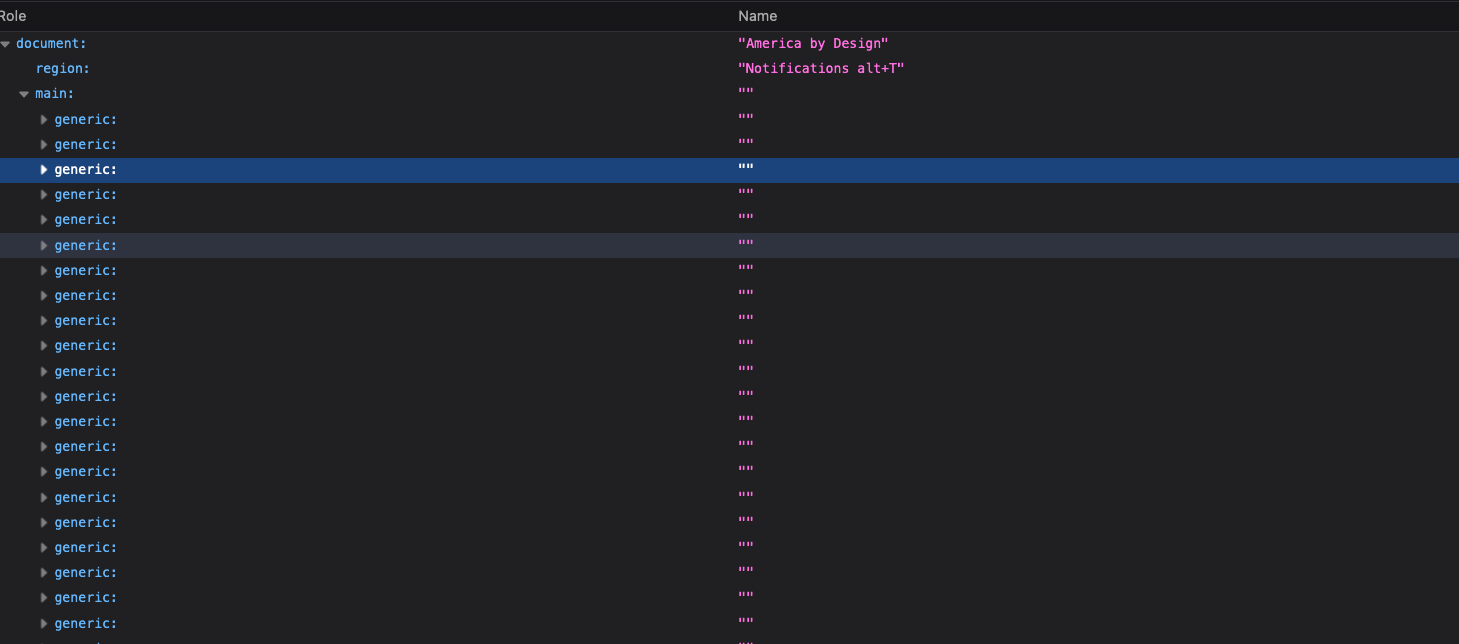
It doesn’t use any text semantics
Visually speaking, this site is predominantly text-based content. So it’s wild that there are exactly 5 <p> tags on the whole site, and two of them are hidden.
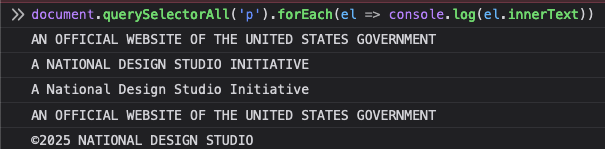
Every block of text is meaningless
Every “paragraph” is a div, with every word wrapped in two spans.
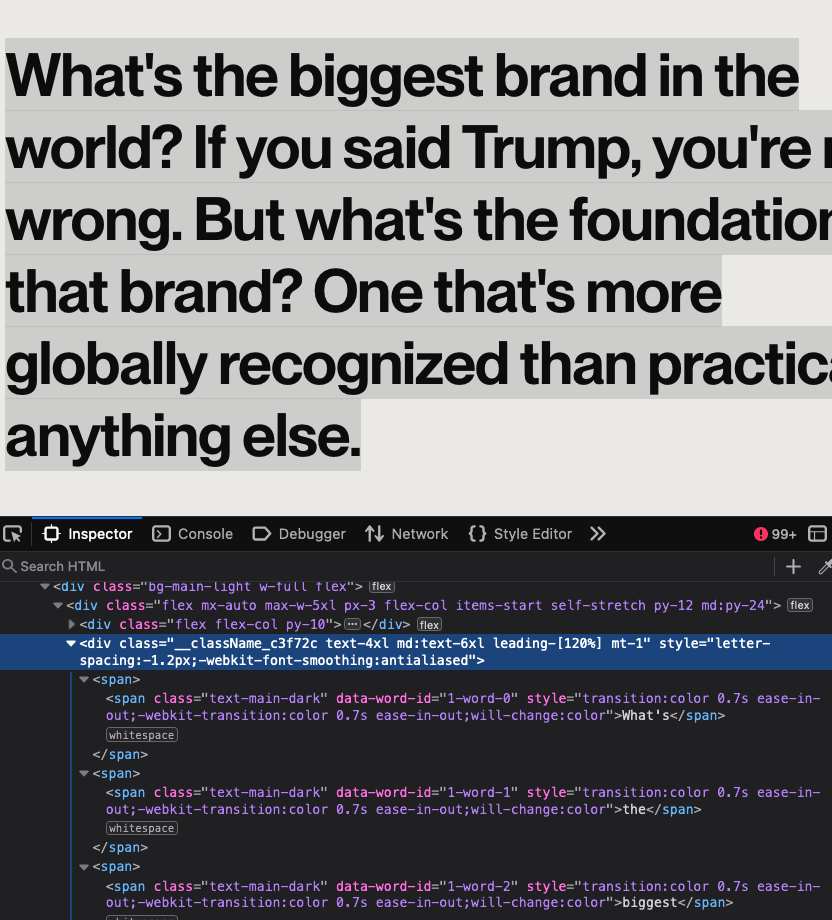
If you’re using a screenreader and you hit the wrong keys, you might accidentally get read the spaces between each word. Or you might get one giant word. Mac’s VoiceOver did both.
Basically, the browser doesn’t even know there’s paragraphs on here.
The form isn’t using proper attributes or labels
There’s a few problems with the contact form:
- It doesn’t use a label for the input
- The placeholder is acting as a label
Let’s get rid of all those silly classes so we can better see the form:
<form class="relative">
  <input type="email" placeholder="Email me updates" required="" value="">
  <button type="submit">Submit</button>
</form>
But this is what it should look like if we cared about accessibility:
<form class="relative">
  <label for="email-updates">Email me updates</label>
  <input type="email" placeholder="citizen@america.com" id="email-updates" required="" value="">
  <button type="submit">Submit</button>
</form>
Form Notifications are…ugh
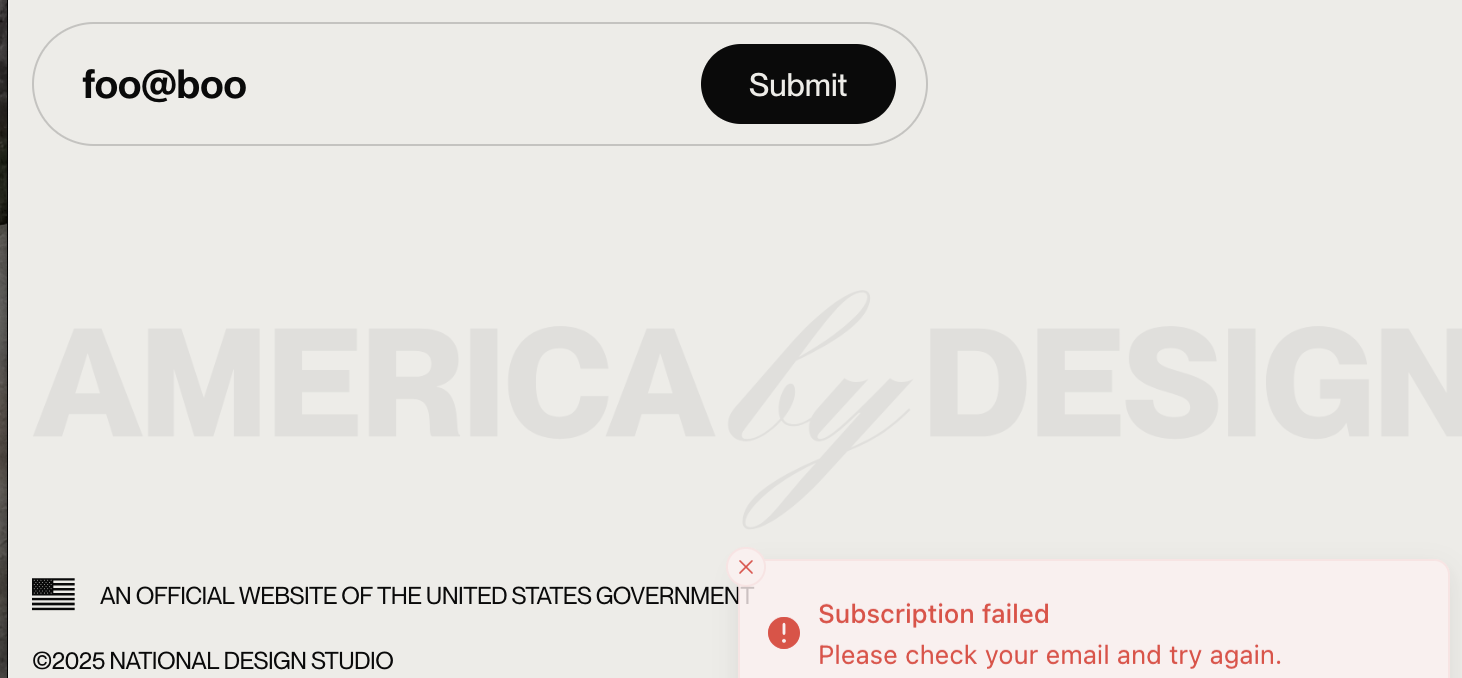
When you submit an email, you get a “toast” that appears in the bottom right corner

The HTML for this notification gets dropped into the one empty section at the top of the page that’s marked as aria-live so that a screen reader announces it (which it does, and also tells you about cloudflare before getting cut off)
But if the developers had bothered to use the <output> element, and then associated it with the form, they could’ve gotten aria-live functionality for free. Because semantic HTML is accessible HTML:
<form class="relative" id="subscribe">
  <label for="email-updates">Email me updates</label>
  <input type="email" placeholder="citizen@america.com" id="email-updates" required="" value="">
  <button type="submit">Submit</button>
</form>
<output name="subscription-message" form="subscribe">
  <h2>Successfully subscribed</h2>
  <p>You'll be notified when we have updates</p>
</output>
Form validation ain’t great
And, BTW, if you input an invalid email it lets you submit it all the same.
It can’t even <i>
Let’s dial in to the one block of text that looks different from the others:

Let’s take note of some interesting features:
- The first word in each line is capitalized
- Each line ends with a comma
- The vertical spacing is closer together
It’s almost…like… that’s… a list. It looks quite listy.
So it should be a ul, right?
Then why the fuck does it look like this?
<i>Pay off your student loans,<br>Move through TSA,<br>Renew your passport,<br>Visit national monuments,<br>Apply for a small business loan,<br>Apply for your green card,<br>Stay the night at a National Park,<br>Manage your social security.<br>Even file your taxes.</i>
This, in the technical sense, is fucking dumb.
- A list of things belongs in a fucking
ul - We don’t line break with a
<br>when each line looks like a new line; that’s what<li>is for - <i> is for phrasing content, which means it needs to be a child of palpable content, which it is not
- This isn’t even a proper use of
<i>
The specifications for <i> make it clear that you should not use it just for italicized text. You use it for alternative voice. This text does not meet that criteria at all.
There’s no discernible reason for this content to have been marked up this way.
Architecturally speaking, this whole thing is shit
It’s not just shit. It’s like a football team with a stomach bug all had to use the same Taco Bell bathroom. It’s shit that is actively shitting shits.
A while back I wrote a very angry rant about front-end development and I called out the pants-on-head stupidity of using JavaScript frameworks for rendering very ordinary static sites.
Some people didn’t like my opinions.
One person disliked my thoughts so much he dedicated a 1.5 hour YouTube video to disagreeing with me.
But guess what? This site proves I’m right and that person is a doo-doo head. Because this site is a a Next.js app.
This had no fucking business being in Next.js, React, or even JavaScript
Vercel, who maintains Next.js, describes their framework:
Used by some of the world’s largest companies, Next.js enables you to create high-quality web applications with the power of React components.
https://nextjs.org/
Did you catch that? How they hey said “high-quality,” and not, “pant-shittingly bad”?
Vercel either needs to change their claim or send the US government a cease and desist because this is the lowest-fucking-quality web app I’ve ever seen for any government site — and I remember when the website for North Korea wrapped Kim Jong-Il’s name in 15 <strong>.
This site is as static as it gets. There was no reason for it to be in React, let alone Next.js. And the fact that this site is Next.js proves that using JavaScript frameworks to deliver static content enables Olympic-level stupidity.
This site should have been a single HTML file
AmericaByDesign is entirely too heavy for a static web page
Let’s once again keep in mind that this site is text. A site with text (and basic text at that) has no reason to require over 3MB of resources.
This site is transferring
- 1.8 MB video
- 658KB of JavaScript
- 76KB of minified HTML
- 52KB favicon
- 10kb of imagery
- 6 KB of CSS
The amount of JavaScript is insane. The only thing this site needs JavaScript for is monitoring scrolling so that it can transition text from one color to another. And it does that by toggling a class name.
The size of the HTML is insane, too. But that’s related to the fact that it’s insane with it’s CSS. Because
AmericaByDesign uses Tailwind and Stupidity
First of all, I don’t like Tailwind. Tailwind is a CSS-framework whose primary goal is to to keep you from writing CSS. It does this by giving you hundreds of single-responsibility classes so that you can put dozens of utility classes on every single HTML element, so that you never have to open a CSS file.
If you’re writing HTML that’s never going to be used in another context, and likely won’t ever be part of a template, Tailwind might be an option. Because of my background in content management where my whole-ass job is making it possible to reuse a piece of content in many contexts, Tailwind has no value.
But…whatever. Some Web App developers use Tailwind and love it, so I love that for them.
This site cascades stupidity
If you removed all the Tailwind classes, that would take 10KB off the size of the HTML file.
If you don’t believe me, try it yourself. Download the HTML and do a find & replace with this regex: (class=")(\w|\s|-|:|[0-9]|.|_|[|]|%|\/)+"
You’d think that would take off more, but you’d be wrong. And that’s because of all the inline styles.
Tailwind is supposed to bring CSS into your markup. So why, then, does this site also use inline styles?
Every word is wrapped in two spans, one of which has duplicated inline styles
Let’s re-evaluate a single paragraph of non-<p> text:
<div class="__className_c3f72c text-4xl md:text-6xl leading-[120%] mt-[75px]" style="letter-spacing:-1.2px;-webkit-font-smoothing:antialiased">
	<span><span data-word-id="20-word-0" class="text-text-dimmed" style="transition:color 0.7s ease-in-out;-webkit-transition:color 0.7s ease-in-out;will-change:color">The</span> </span>
	<span><span data-word-id="20-word-1" class="text-text-dimmed" style="transition:color 0.7s ease-in-out;-webkit-transition:color 0.7s ease-in-out;will-change:color">things</span> </span>
	<span><span data-word-id="20-word-2" class="text-text-dimmed" style="transition:color 0.7s ease-in-out;-webkit-transition:color 0.7s ease-in-out;will-change:color">that</span> </span>
	<span><span data-word-id="20-word-3" class="text-text-dimmed" style="transition:color 0.7s ease-in-out;-webkit-transition:color 0.7s ease-in-out;will-change:color">create</span> </span>
	<span><span data-word-id="20-word-4" class="text-text-dimmed" style="transition:color 0.7s ease-in-out;-webkit-transition:color 0.7s ease-in-out;will-change:color">the</span> </span>
	<span><span data-word-id="20-word-5" class="text-text-dimmed" style="transition:color 0.7s ease-in-out;-webkit-transition:color 0.7s ease-in-out;will-change:color">interface</span> </span>
	<span><span data-word-id="20-word-6" class="text-text-dimmed" style="transition:color 0.7s ease-in-out;-webkit-transition:color 0.7s ease-in-out;will-change:color">to</span> </span>
	<span><span data-word-id="20-word-7" class="text-text-dimmed" style="transition:color 0.7s ease-in-out;-webkit-transition:color 0.7s ease-in-out;will-change:color">society.</span></span>
</div>
- The first
spanhas no attributes at all - Every nested
spanhas a completely uniquedata-word-id - Every nested
spanhas the classtext-text-dimmed - Every nested
spanhas the same inline style
What could make this nominally better?
- remove the unnecessary parent
span - use an
idinstead ofdata-word-id - Use a
classinstead of an inline style
The result would be an HTML file that’s only about 40kb.
Allow me to rephrase:
Undoing three incredibly stupid things that no sensible developer would’ve done would result in a 53% savings in file size.
This whole thing is fucking stupid. Actually, it’s more like it fucked stupid and caught Chlamydia. It’s almost… too stupid…
I’m pretty sure this whole site is AI-generated
Because it does way too much stupid shit that no web developer should have done.
- It uses no text semantics at all
- It uses the minimal structural semantics incorrectly
- The one semantic element
<i>in all of the text is used weirdly wrong - Styles are done like no sensible developer would do
- The subscribe form isn’t labeled properly
- This thing is needlessly bloated
- It’s a friggin’ SPA when it didn’t have to be
This looks and smells like AI.
This site was vibe-coded in an afternoon by someone who still swears they’re just “microdosing” mushrooms when they ate the whole bag.
What does AmericaByDesign even say?
For the first time, let’s focus on the content of the site. It asks insightful questions, after all:
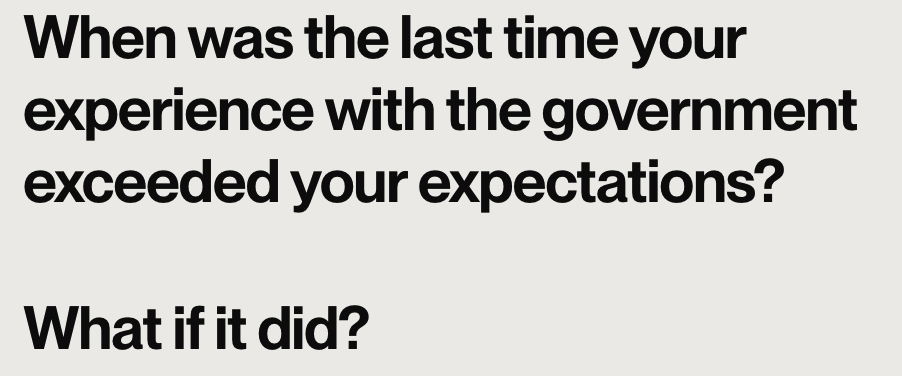
Now let’s ask some questions:
What if it failed to meet the bare minimum?
What if the government has been conditioned accept apathy towards its citizens as normal?
It’s not good.
Permalink
I can’t help thinking it’s “pants-shittingly” rather than “pant-shittingly”, but I’ll allow for the possibility that both terms could be applied simultaneously to this site.
Seriously: nice rant on many fronts. Thanks Frank
Permalink
While this is a rant, the logic behind the rant is abundantly made clear. At least it wasn’t designed in Flash.