Sometimes we don’t want to use a full-blown SPA. And sometimes when we don’t want that full-blown SPA, we do want some SPA-like features likes maybe state management attached to some small element of the User Interface.
I ran into this kind of situation at Red Hat last year, and I want to share how I solved this problem by creating a lil’ tiny state manager called CheapState.

(Logo courtesy of Tobias Williams)
Why CheapState?
It’s a play off the word “Cheapskate” which means something like, “cheap person who tries to avoid paying full cost.” And that’s because that’s exactly what it aims to do with state: It helps you avoid invoking the weightier likes of Redux, Recoil, Piña, Hookstate, and similar while also allowing the state to actually persist.
What does CheapState do?
“Wait, it also allows state to persist,” you ask yourself as you ponder if state is really just one edge of a continuum of permanency for data.
That’s a valid question, because CheapState implements a namespaced publication – subscriber pattern on top of localStorage.
So because it sits on top of the web browser’s localStorage API, it gives you the option to have that data persist beyond the browser session. 1
When is CheapState really useful?
When you don’t need a Single-Page Application (SPA) but you do need:
- Multiple UI elements to update based on changes to data
- Data that could persist across browser tabs
- Other events to occur based on changes to data in the browser
- An option for data to persist beyond the browser session
- A very simple API
- A lighweight API (It’s only 32.9kB unpacked)
Try it out
First, install it
npm i cheapstate
Then import it
import CheapState from 'cheapstate';
A Basic Example: Give Accordions memory
First assume some markup
<details class="accordion__drawer">
	<summary class="accordion__drawerTitle">
		What is the meaning of Life
	</summary>
	<p>The number 42 is, in The Hitchhiker's Guide to the Galaxy by Douglas Adams, the "Answer to the Ultimate Question of Life, the Universe, and Everything", calculated by an enormous supercomputer named Deep Thought over a period of 7.5 million years. Unfortunately, no one knows what the question is. Thus, to calculate the Ultimate Question, a special computer the size of a small planet was built from organic components and named "Earth".</p>
</details>
Next, create some state
For this example, we’re going super basic and assuming just one page in our site has accordions.
The first argument is the name of your instance. CheapState uses this to create a fully namespaced instance so that you don’t have to worry about collisions.
The second argument is optional, but it lets you designate whether it’s localStorage or sessionStorage (it’ll assume local by default).
const accordionState = new CheapState("open-accordions", 'local');
I’m walking you through a contrived example right now, but you could totally be more dynamic. If you have lots of pages with accordions, set the namespace instance to your page title or to some path of the URL.
Then, add some events that add stuff to state
For the accordions, we’ll do this in some basic steps:
- Find the expand/collapse containers
- Bind events to the containers
- When a container is opened, get the text from the title, use the title as the key and set a value to open
- When a container is closed, just delete it from state
// Step 1. Find the containers
const toStateElements = document.querySelectorAll(".accordion__drawer");

// Step 2. Bind events to the elements
toStateElements.forEach((toStateElement) => {
  toStateElement.addEventListener("toggle", (toggleEvt) => {
    // 2.1 Get title element
      const accordionTitleElement = toStateElement.querySelector(".accordion__drawerTitle");
    // 2.2 Get Title Text
      const accordionTitle = accordionTitleElement.innerText;

    // 2.3.a If it's been opened, set it in state
      if (toStateElement.open && !accordionState.has(accordionTitle)) {
        accordionState.set(accordionTitle, "open");
      }
    // 2.3.b If it's been closed, delete from state
      if (!toStateElement.open && accordionState.has(accordionTitle)) {
        accordionState.delete(accordionTitle);
      }
  });
});
Finally, add some events that get stuff from state on page load
This will apply our state on page load in three(ish) steps:
- Find the containers (kind of unnecessary, since we already know, but this is just to be very explicit)
- Create a convenience function that figures out what needs to be updated, and does the updating
- Run that function on page load
// Step 1. Find the containers
const fromStateElements = document.querySelectorAll(".accordion__drawer");

// Step 2. Create a convenience function
function updateFromStateElements() {

  // Loop through what has to be updated
  fromStateElements.forEach((fromStateElement) => {

    // 2.1 get the title element
    const accordionTitleElement = fromStateElement.querySelector(".accordion__drawerTitle");

    // 2.2 Get the title text
    const accordionTitle = accordionTitleElement.innerText;

    // If it's there, open it!
    if (accordionState.has(accordionTitle)) {
      accordionTitleElement.parentElement.open = true;
    }
  });
}

//  3: run our convenience function
window.addEventListener("load", () => {
  updateFromStateElements();
});
As a bonus option, share state across tabs
What if a user had the page open in two browser windows / tabs. Would you want the elements closed in one tab to be automatically closed in the other?
You could totally do that with a subscriber:
accordionState.subscribe((payload) => {
  const {key, value} = payload;
  const accordionTitleElements = document.querySelectorAll('.accordion__drawerTitle');
  const [accordionTitleEl] = [...accordionTitleElements].filter((accordionTitleEl) => accordionTitleEl.innerText === key );

  if (value === 'open' && accordionTitleEl) {
    accordionTitleEl.parentElement.open = true
  } else {
    accordionTitleEl.parentElement.open = false;
  }
});
That payload that comes back will give you up to four values:
type: it could be ‘set’ or ‘delete’,key: the key name usedvalue: the new valueoldValue: the previous value, if there was one
Check out the complete example on CodePen. The real fun is when you open it up in two windows (in the same browser).
Another Example: Get State from User’s Scrolling
This is a slightly more advanced example that uses IntersectionObserver. As an article passes into view, that goes into CheapState.
A subscriber to the state updates the title when an article passes into view.
On page load, CheapState gets the last article read and scrolls it into view. But go ahead and crack that one open in another browser window and scroll. See how one updates the other? You may not want that option — and that’s fine. What you do in a subscriber is up to you.
See the Pen CheapState Demo: Current Article by Paceaux (@paceaux) on CodePen.
The Most Advanced Example
I implemented CheapState on the starting page of Red Hat’s Customer Portal. When a user authenticates, we track the user’s learning progress of the three learning paths.
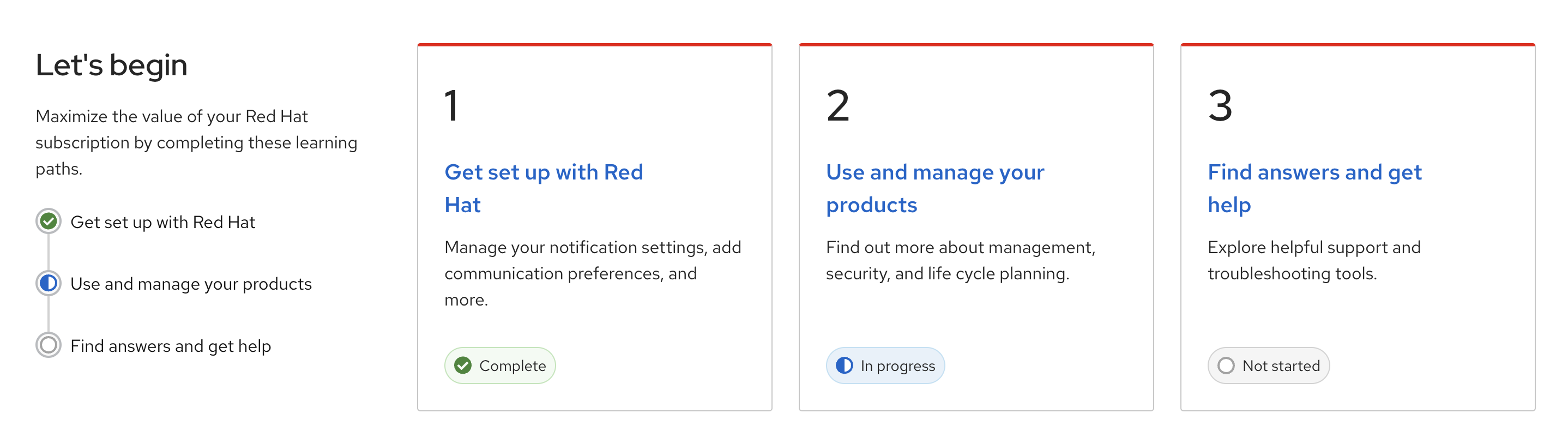
Where CheapState gets involved is by being the one singular place that both those icons on the left as well as icons in the cards get their information.
When you navigate to a given learning path page, CheapState gets updated. Which means that if you left the landing page in one window, and started reading the content in the other, the landing page automatically reflects the change in your progress.
Now, that’s not all that’s happening: there is also an API where we’re updating the user progress on a server. There’s a middle layer (in the browser) that handles synchronization between the server and browser state which means that even if you lost internet connection at some point, you never lose your progress.
CheapState is WebStorage++
The WebStorage API all on its own only stores strings as the values. But CheapState will work with strings, numbers, booleans, objects, and arrays.
Not only does it let you store and retrieve an object, what if you wanted to take the keys out of an object and store them individually? You can do that with setObject().
someStorage.setObject({
    'frank': 10,
    'joe': 20,
    'sally': 30
});
Now you can get that data back a tad easier:
const frank = someStorage.get('frank');
Where can you see the code?
It’s over on Github. I’d welcome contributions and feature requests. For right now the one feature I think it might need is something for setting timestamps on the data, but if you’ve got other ideas, drop me a note.
Sources and Whatnots
- Most of the time when we say “localStorage” what we actually mean is the WebStorage API. The WebStorage API has two mechanisms which are sessionStorage and localStorage.