You’re doing your thing: Writing some markup for some Drupal template. Turns out a lil’ part of your template uses something coming out of a Drupal module. Like maybe Fences is just trying way too hard and you need to… not do that. At all.
So. How would you override this one little template for a thing coming out of a module?
This amounts to maybe three basic steps
- Use theme hook suggestions to figure out what the name of the file could be
- Put that file somewhere in your theme’s components folder
- Edit that file as you see fit
The catch is figuring out what name to use for that file. Drupal knows what name it should be. The problem is, “do you?”
Turn on Theme Hook Suggestions
Turns out, when you want to override something, that’s called a “Theme Hook”. And what you want is a way to get suggestions for how.
So turn on your Theme Hook Suggestions.
- Find your “development.services.yml” file
- look under the
twig.configsection - Add
debug: true
So it might need to look something like this:
parameters:
  twig.config:
    debug: true
    auto_reload: true
    cache: false
services:
  cache.backend.null:
    class: Drupal\Core\Cache\NullBackendFactory
Do note that this is YAML, so you should copy and paste at your own risk.
Next, use one of the suggestions
Now that debugging is on, let’s use it.
Go find the suggestions
Let’s do some good ol’ right-click, inspect element in the browser and see what Drupal is going to tell us. Here’s a sample of what might be printed in the HTML:
Not gonna lie, maybe a better name would be, “TEMPLATE OVERRIDE FILE NAME SUGGESTIONS”.
<!-- THEME HOOK: 'field' -->
<!-- FILE NAME SUGGESTIONS:
   x field--node--field-topics--blog-post.html.twig
   * field--node--field-topics.html.twig
   * field--node--blog-post.html.twig
   * field--field-topics.html.twig
   * field--entity-reference.html.twig
   * field.html.twig
-->
Pay special attention to what precedes the suggested name:
An x or a * .
The * is an option you can chose. The x is an option that’s already taken (I took it, in this case). You may have to try more than one file name. Don’t expect the first one to always be the one (it took me three tries).
Put the file name somewhere in your themes folder
We have lots of overrides in our theme’s folder, so I ended up putting this in the “templates/field” directory within it.
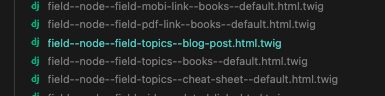
Get Drupal to pick up your override
Now you’ll have to clear Drupal’s theme-registry cache. There’s two ways to do this:
Clear one specific cache:
drush cache:clear
Be sure to select option 2 for theme-registry.
Rebuild the cache
drush cr
Finally, write your new markup
In my case I was kinda mad that Fences was adding a bunch of markup I didn’t really want. So my solution ended up to strip out most of the markup that was there (because this was already 13 levels deep in div-city. I didn’t need to make it a friggin’ burough)
{#
/**
 * @file
 * Theme override for a field.
 */
#}
{% set title_classes = [
    'field__label',
    label_display == 'visually_hidden' ? 'visually-hidden',
  ] %}

{% if not label_hidden and display_label_tag %}
    <{{ label_tag|default('div') }}{{ title_attributes.addClass(title_classes) }}>{{ label }}</{{ label_tag|default('div') }}>
{% endif %}
{% for item in items %}
        {{ item.content }}
{% endfor %}
Profit
So that was it
If you want to override the template for Drupal module, it’s four-ish steps:
- Turn on theme hook suggestions
- Try out a few suggested file names
- Write the new markup
- Profit